Every Docker container gets a real HTTPS URL.
Stop juggling localhost:3000. Envy gives every container a
trusted https://<name>.envy URL — automatic DNS,
local certificates your browser actually trusts, zero config. Free and open source.
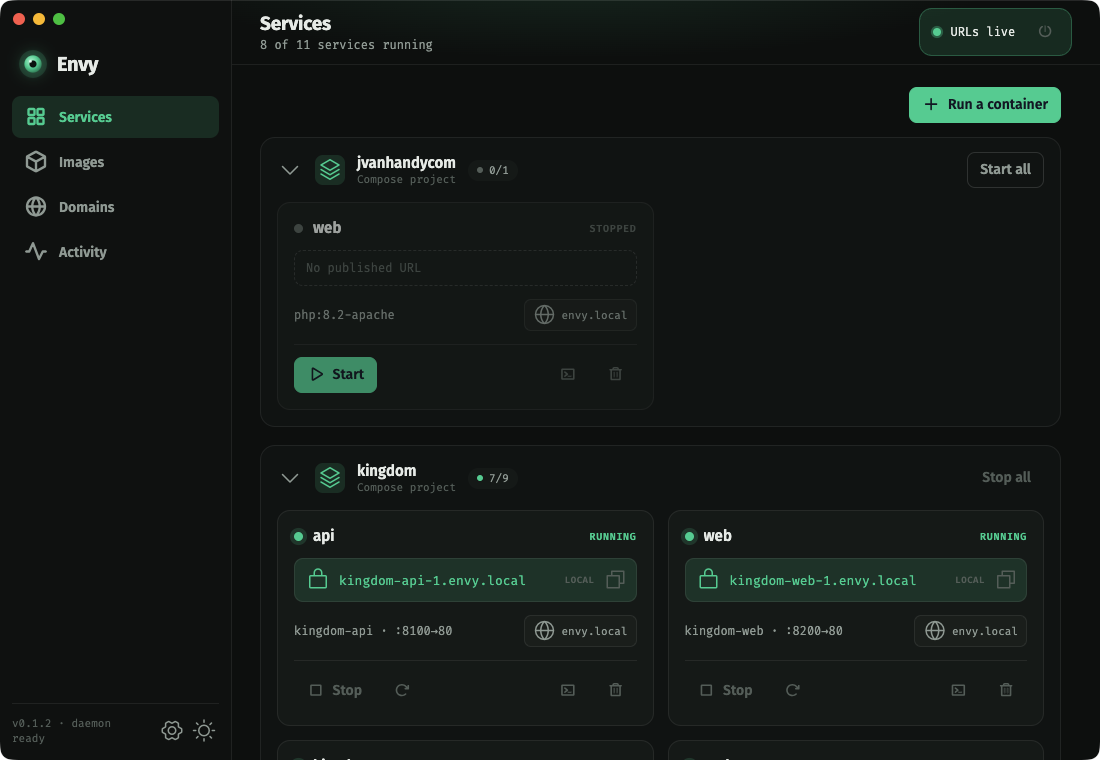
Local development should feel like production.
Real hostnames. Real HTTPS. The same URLs your app will use in production — running on your laptop, against your Docker containers, with nothing to configure.
Names, not port numbers
Your api container is https://api.envy — not localhost:8080. No more remembering which service is on which port, or fighting collisions when two of them want 3000.
HTTPS that just works
OAuth redirects, secure cookies, SameSite, service workers — half of modern web dev assumes https://. Envy serves trusted TLS locally so your dev environment stops being the exception.
Nothing leaves your machine
No tunnels, no cloud relay, no account. Envy runs a local DNS resolver and a private certificate authority on your own machine. Your traffic never hits the internet to get a hostname.
Everything, handled.
Point Envy at Docker and it does the tedious networking — DNS, certificates,
reverse proxy — so you don't touch /etc/hosts or nginx again.
Automatic HTTPS
Every running container gets a trusted https://<name>.envy URL the moment it starts — no per-app setup, no self-signed warnings.
Zero-config DNS
A local resolver answers *.envy instantly — wildcard, no /etc/hosts edits, no dnsmasq to babysit. New container, new name, immediately.
Custom domains
Want shop.test or acme.localhost instead? Add a suffix and assign it per container. Set a primary so new containers pick it up automatically.
Trusted local certs
Envy runs a private CA that your system and browsers trust, so the green padlock shows up with no “Not secure” banners and no clicking through warnings.
Menu-bar & tray control
Start, stop, and restart containers right from the menu bar (or system tray on Windows/Linux) — grouped by Compose project, just like the app. Envy keeps serving your URLs in the background.
Works with your Docker
Docker Desktop, OrbStack, or colima — Envy talks to the local Docker socket you already have. Live activity, logs, and an exec shell are built in.
Three things a screenshot tells better than a sentence.
No staged mockups. These are the real app, doing the real work.
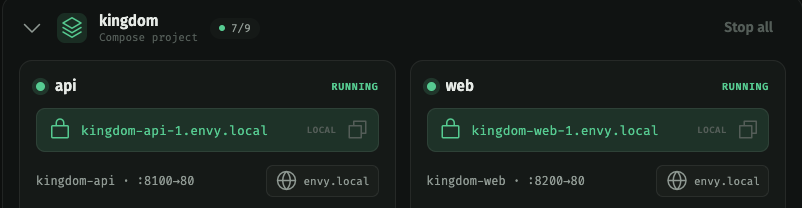
Every container, its own URL
Spin up a container and it appears with a live
https://<name>.envy link. Click to open it in
the browser — already trusted, already routed.
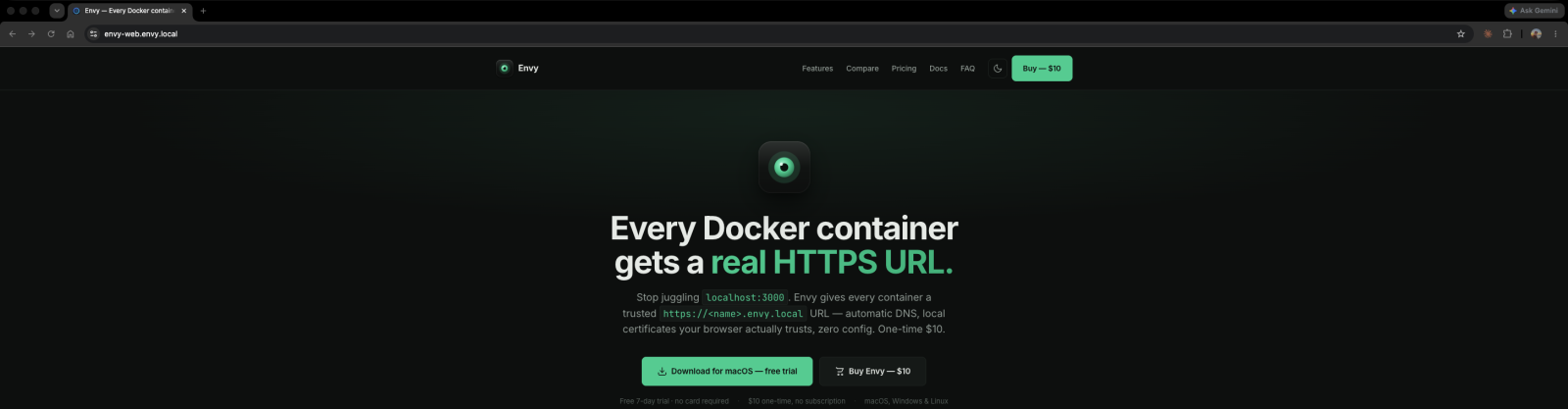
Trusted HTTPS, locally
Envy's local CA is trusted by your system, so .envy
URLs load over real, trusted HTTPS — the browser's secure-site
indicator, no warnings and no exceptions to click through.
How it compares.
There's more than one way to get a local hostname. Here's where Envy fits against the usual approaches.
| What you want | Envy | hosts + nginx + mkcert | ngrok / tunnels | raw localhost |
|---|---|---|---|---|
| Automatic per-container URLs | ✓ | Manual | One at a time | Ports only |
| Trusted HTTPS, no warnings | ✓ | mkcert setup | ✓ (remote) | No |
| Wildcard DNS, no host edits | ✓ | Edit hosts | N/A | N/A |
| Stays fully offline / private | ✓ | ✓ | Cloud relay | ✓ |
| Setup effort | One click | Hours of config | Per-session | None |
| Price | Free & open source | Free / DIY | Free / $8+ mo | Free |
Download it. It's free.
Every feature, no account, no license keys. Grab a build below or from GitHub Releases — or build it from source.
macOS (Apple Silicon & Intel) · Windows 10/11 · Linux coming soon. Envy installs a small background helper (one prompt) to serve DNS and HTTPS on ports 53/80/443. You can remove it any time from the app.
Free. MIT-licensed. Yours.
Envy is open source under the MIT license. No license keys, no trials, no account — and it runs entirely on your machine, so there's no server between you and your containers. Read the code, file issues, send pull requests.
Envy
For every developer
Free MIT license
- Native apps for macOS, Windows & Linux
- Unlimited containers & custom domains
- Trusted local HTTPS + automatic DNS
- Use it on as many machines as you like
- All updates included, forever
- Source on GitHub — issues and PRs welcome
Questions, answered.
Is Envy really free?
Yes. Envy is open source under the MIT license — every feature, free, on every platform. No trial, no license keys, no account. The source lives on GitHub, and you can build it yourself if you'd rather not use the prebuilt releases.
How does Envy give containers a URL?
Envy watches your Docker socket and, for each container, publishes a
route on a small reverse proxy. A local DNS resolver answers
*.envy (and any custom suffixes you add), and a
private certificate authority issues the TLS cert — so
https://<name>.envy just resolves and loads.
Does it need my password / sudo?
Once, at setup. Serving DNS and HTTPS on ports 53/80/443 and installing a trusted local certificate authority require elevated privileges, so Envy installs a small background helper behind a single password prompt (your OS's standard elevation dialog). After that it runs on its own — you can remove it any time from the app.
Will my browser trust the HTTPS certificates?
Yes. Envy adds its local CA to your system trust store, so Safari,
Chrome, and Firefox show a normal padlock for .envy
URLs — no “Not secure” banner and no exceptions to click
through. The CA is local to your machine and never leaves it.
Does it work offline?
Always. DNS, certificates, and routing all run locally — no internet required, no account, and nothing phones home. The only network call Envy ever makes is checking GitHub for app updates.
Will it cost money later?
No. Envy is MIT-licensed open source — the code is public and free forever. Even if the project ever changed direction, the source and every released version stay available under MIT.
Which Docker setups are supported?
Anything that exposes the standard local Docker socket — Docker Desktop, OrbStack, and colima all work. Envy connects automatically when Docker is running and reconnects on its own if you restart it.
What platforms does Envy run on?
Envy runs on macOS (Apple Silicon & Intel), Windows 10/11, and Linux (AppImage, x64 & arm64). The same trusted local HTTPS works across all three.
What if I find a bug?
Open an issue on GitHub with a description and (if possible) the steps to reproduce — or email support@melodic.dev. Pull requests are welcome too.